
How it works
From locked archive to recovered password
ZipRecover runs entirely in your browser. Each step below shows what happens to your file and why it never leaves your device.
How recovery works, step by step
1. Local file read
You pick a ZIP from your device. The browser reads its bytes with the File API, on this page, and never sends them to a server.
2. Format detection
The page parses the ZIP structure (central directory, local headers, extra fields), detects ZipCrypto or WinZip AES and the key size, and extracts one encrypted entry for testing, preferring the smallest one large enough to confirm a password decisively (among entries up to 256 MB compressed).
3. Authorization check
Before a search starts, you tick a box confirming you own the archive or are authorized to open it. The Start recovery button stays locked until you do, and so does Resume.
4. Candidate testing
One Web Worker per CPU core tests its share of the candidates from your chosen strategy. The fast pre-checks reject most wrong guesses immediately.
5. The result
A candidate that passes the fast check is confirmed before it is reported whenever the archive allows it: the HMAC for AES, and decryption plus the CRC-32 for a ZipCrypto entry of at least 4 bytes that is stored or Deflate-compressed, which is nearly every archive. When only a shorter or differently compressed ZipCrypto entry can be tested, the result says the password passed a quick check only. Either way it appears in your tab alone.
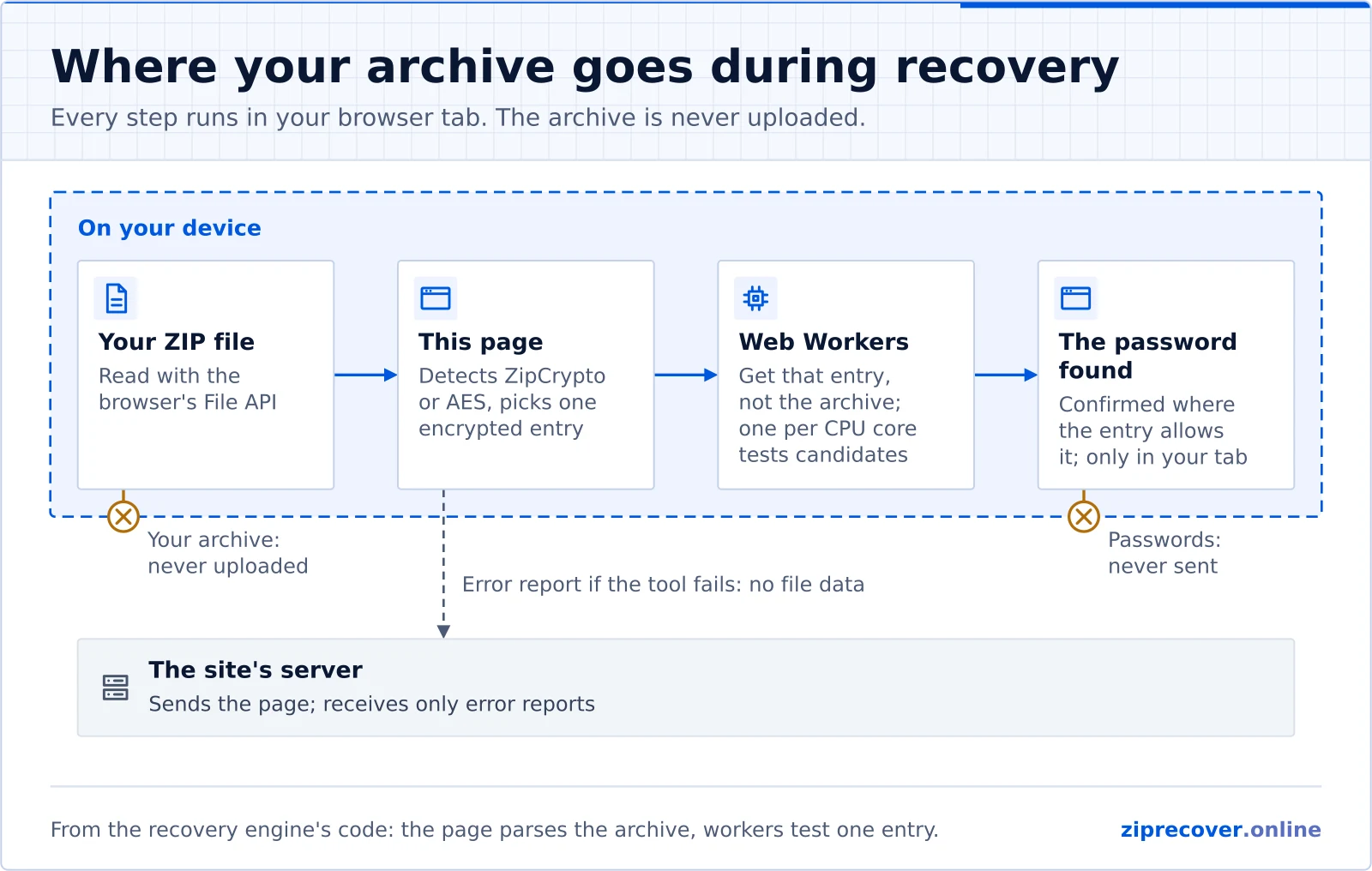
Everything runs on your device
Many online recovery tools ask you to upload your archive to a server you do not control. ZipRecover takes the opposite approach. The archive is opened with the browser's File API and parsed on the page, and all password testing happens in background Web Workers on your own machine, with the heavy hashing in WebAssembly (or, for AES key derivation, the browser's built-in Web Crypto when that is faster on your device). There is no upload step, so there is no copy of your file on anyone else's infrastructure.
How a password is tested
A ZIP archive does not store your password. It stores values derived from it, which is what lets the tool check a guess without ever knowing the original. The exact check depends on the encryption method.
WinZip AES archives
AES-encrypted entries derive a key from your password using PBKDF2-HMAC-SHA1 with 1000 iterations and a random salt stored in the archive. That derivation produces the encryption key, an authentication key, and a 2-byte password verification value. ZipRecover derives the key for each candidate and compares those 2 bytes first. This rejects the overwhelming majority of wrong guesses cheaply. A candidate that passes is then confirmed by recomputing the entry's 10-byte HMAC-SHA1 authentication code, which is a definitive check. Learn more on the AES encryption page.
ZipCrypto archives
Traditional ZipCrypto uses a lightweight keystream. The first 12 bytes of an entry are an encryption header whose final byte must match a known check value. ZipRecover uses that as a fast filter, then confirms a surviving candidate by decrypting the entry, decompressing it with the browser's native inflater, and matching the stored CRC-32.
That confirmation works for entries of at least 4 bytes that are stored or compressed with Deflate, which covers nearly every archive. Below 4 bytes the CRC-32 covers too little plaintext to keep wrong passwords out, so the result says the password passed a quick check only. ZipRecover cannot confirm a ZipCrypto entry compressed with another method, such as BZip2, LZMA, or Deflate64 (options in tools like 7-Zip): for those it only compares the decrypted length with the size recorded in the archive, which a compressed file almost never matches. So when every encrypted file in a ZipCrypto archive uses such a method, a search usually ends without a match even when the right password is tried.
How a success is confirmed
For AES archives and for ZipCrypto entries of at least 4 bytes that are stored or Deflate-compressed, which are nearly all archives, a reported password has passed a full confirmation after the fast filter: the HMAC for AES, and decryption plus the CRC-32 for ZipCrypto. The exception is an archive in which every protected file small enough to check in the browser (256 MB compressed) is a ZipCrypto file that is tiny (under 4 bytes) or uses another compression method: the result then says the password passed only a quick check, and asks you to open the archive with it to be sure.
The three strategies
You choose how candidate passwords are generated:
- Dictionary. Provide a list of likely passwords. Optional variations (capitalization, trailing digits, common leetspeak) are tried automatically. Best when you have a good idea of the password.
- Pattern / mask. Describe the shape you remember using placeholders:
?ddigit,?llowercase,?uuppercase,?ssymbol,?aany. Everything else is literal, for exampleInvoice?d?d?d?d. - Brute force. Try every combination from a character set up to a length you choose. Only practical for short passwords, and far slower on AES archives.
Why speed depends on the archive
| Encryption | Per-candidate cost | Realistic use |
|---|---|---|
| ZipCrypto | Very low | Dictionaries, masks, and short brute-force searches |
| WinZip AES | High (PBKDF2 x1000) | Dictionaries and tightly bounded masks |
Because AES deliberately slows down key derivation, testing is orders of magnitude slower than ZipCrypto. That slowdown is built into the format, so no tool can remove it, and it is why a strong random AES password is effectively not recoverable by guessing. ZipRecover is most effective when you can narrow the search with what you remember.
Authorized use only
Use this tool only on ZIP archives you own or are authorized to access. Attempting to open files without permission may violate applicable laws. See our Acceptable Use Policy and Terms of Use.
Questions about the process
Does the ZIP file get uploaded?
No. The file is read locally with the browser File API and parsed on this page; only the bytes of one encrypted entry, with a summary of the archive (entry names and sizes), go to the Web Workers that test passwords. No request ever carries your archive off the device. See security & privacy.
What does the tool actually test?
For WinZip AES it derives a key with PBKDF2-HMAC-SHA1 and checks the format's 2-byte verification value, then confirms with the stored HMAC. For ZipCrypto it checks the 12-byte header, then confirms by decrypting and matching the CRC-32, which works for entries of at least 4 bytes that are stored or compressed with Deflate (nearly every archive). When only a shorter entry can be tested, the result says the password passed a quick check only; when the only testable entry uses another compression method, the tool can compare only the decrypted length, which the right password usually fails too, so a search usually ends without a match.
Why is AES so much slower than ZipCrypto?
WinZip AES runs PBKDF2 with 1000 iterations of HMAC-SHA1 per candidate on purpose, to make guessing expensive. ZipCrypto has no such stretching, so many more candidates can be tested per second.
Can I pause and pick up later?
Yes. Recovery runs in Web Workers, so the page stays responsive while you pause or resume. Mask and brute-force searches save their progress on this device as they run, so after a reload, or after closing the tab, choosing the same file again offers to continue. Stop ends a search for good and deletes its saved progress, and dictionary searches always start over.
ZIP Password Recovery guide
Continue exploring this topic
Related topics: ZIP Encryption Privacy & Local Processing
Ready to recover your ZIP password?
Runs locally in your browser. Your archive never leaves your device.