Timing
How long ZIP password recovery takes
It depends on four things: the encryption method, the password's length and character set, the attack type you run, and your device. The reference points below let you estimate your own case to within an order of magnitude.
Why there is no single answer
There is no single number for how long ZIP password recovery takes. The same archive can be solved in a second, or never solved at all, depending on the password behind it and the method used to protect it. Anyone who quotes a fixed time without seeing your file is guessing.
Four things dominate the timing: the encryption method on the archive, the length and character set of the password, the attack type you run, and the speed of your device. The first two are fixed by whoever created the file. The last two are yours to control, and they are where a sensible strategy earns its keep.
The encryption method sets the pace
The single biggest factor is how the archive was encrypted, because it decides how expensive each individual guess is to test.
- ZipCrypto, the legacy method, is cheap to test. There is no deliberate slowdown, so a modern machine checks candidates quickly. As a rough, device-dependent reference, a single thread tests roughly 240,000 ZipCrypto candidates per second on one core (measured with the site's proof script; your device will differ).
- WinZip AES is slow to test on purpose. It derives a key with PBKDF2-HMAC-SHA1 running 1,000 iterations for every candidate, specifically to make bulk guessing expensive. On the same core, that drops testing to roughly 640 candidates per second (measured with the site's proof script; your device will differ). That rate is for AES-256; an AES-128 archive needs half the key-derivation work per candidate, so it tests up to about twice as fast.
That is a gap of roughly two to three orders of magnitude per guess, before you change anything else. A search that takes about 2.5 hours on a ZipCrypto archive takes about 40 days on an AES-256 archive of the same shape. The WinZip AES encryption page explains why that slowdown is deliberate.
Treat every figure here as an order of magnitude
The rates above are rough reference points. Real throughput depends on your processor, your browser, and how many worker threads you run. Nothing here is a promise of a specific time for a specific file.
Password length and character set
For a brute-force search, every extra character multiplies the number of possible passwords by the size of the character set. That multiplication is why length matters more than any other single property of a password.
| Length | Lowercase only (26) | Lowercase + digits (36) |
|---|---|---|
| 4 characters | 456,976 | 1,679,616 |
| 6 characters | 308,915,776 | 2,176,782,336 |
| 8 characters | 208,827,064,576 | 2,821,109,907,456 |
Adding two characters does not double the work, it multiplies it by hundreds or thousands. Widening the character set does the same. A short password from a small set is often trivial to search, while a long one from a large set is not.
What that means in time
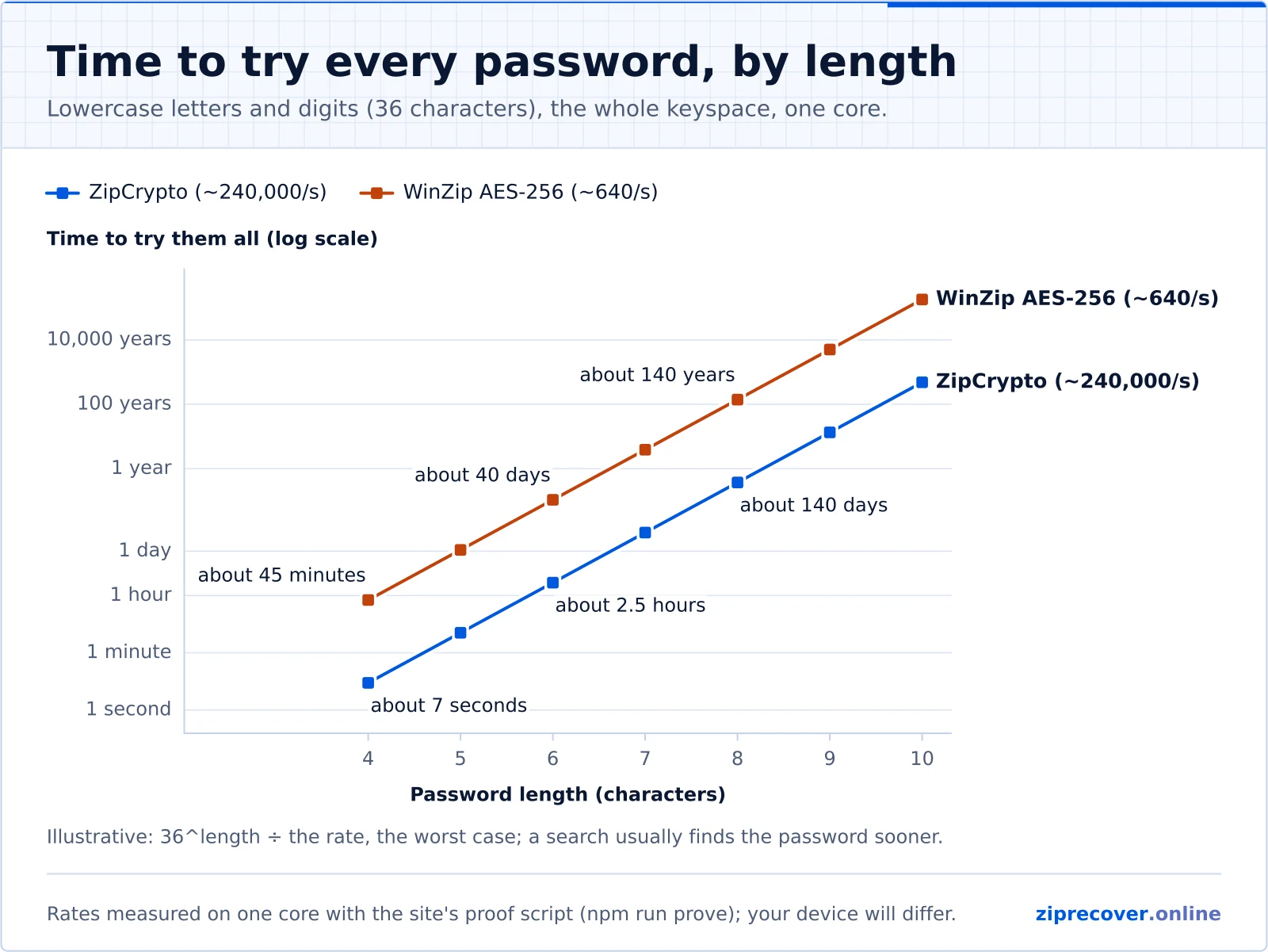
Those counts become concrete once you divide by a testing rate. The table below takes the lowercase-plus-digits column and translates the worst case, exhausting the entire space on a single thread, into approximate time at the reference rates above.
| Length | ZipCrypto (~240,000/s) | WinZip AES-256 (~640/s) |
|---|---|---|
| 4 characters | about 7 seconds | about 45 minutes |
| 6 characters | about 2.5 hours | about 40 days |
| 8 characters | about 140 days | about 140 years |
Two more characters turn hours into months, and on AES they turn weeks into lifetimes. The figures are rough and device-dependent, and on average a correct password appears partway through a search rather than at the very end, but the shape holds: brute force scales badly, and AES makes it scale worse.
The attack type shrinks the search
Those worst-case numbers assume you know nothing and test every combination blindly. You rarely have to. A recovery run does not need to cover the whole keyspace, only the region your real password lives in.
- A dictionary of passwords you actually use may hold the answer in its first few hundred entries. That can finish in seconds, even on AES.
- A mask that captures the shape you remember, such as a familiar word followed by four digits, might describe a few tens of thousands of candidates instead of trillions. That, too, can finish in seconds or minutes.
- Brute force is the last resort, not the first, because it ignores what you know and pays the full price of the keyspace.
The times in the tables are therefore a ceiling for a blind search; a well-aimed one rarely comes close to them. The ZIP password recovery overview walks through choosing between these approaches.
When the answer is effectively never
If your archive uses WinZip AES and the password was generated at random, long, and drawn from a large character set, guessing will not recover it in any timeframe that matters. There is no weakness to exploit and no shortcut around PBKDF2. A twelve-character random AES password is out of reach for every tool, this one included, and any tool that claims otherwise is not being straight with you. Recovery is realistic when a person chose the password and can describe part of it. If that does not match your situation, the guide to why recovery can fail covers what else to check.
Getting to a result sooner
You cannot change the encryption on an archive you are trying to open, but you can control how well-aimed the search is, and that is what decides whether a run finishes in seconds or never. Start with what you remember: the words, dates, and patterns you tend to use, and the rough length. Run a dictionary first, then a mask, and keep brute force for short passwords on ZipCrypto only. The more precisely you describe the password, the smaller the search becomes and the sooner it ends. When you are ready, open the recovery tool and load your archive.
Authorized use only
Use this tool only on ZIP archives you own or are authorized to access. Attempting to open files without permission may violate applicable laws. See our Acceptable Use Policy and Terms of Use.
Frequently asked
How long will my recovery take?
It depends mostly on the encryption method and on how much you remember. A good dictionary or a well-shaped mask can finish in seconds, even on WinZip AES, while a blind brute-force search on a long password can run for effectively forever. The more precisely you can describe the password, the shorter the estimate.
Does a faster computer make a big difference?
It helps, but less than people expect. More threads and a quicker processor test more candidates per second, yet that only scales the speed linearly. Doubling your speed halves the time, while adding one character to the password can multiply the work many times over. Narrowing the search matters far more than hardware.
Why is WinZip AES so much slower to test than ZipCrypto?
WinZip AES runs PBKDF2-HMAC-SHA1 with 1,000 iterations for every candidate on purpose, to make bulk guessing slow. ZipCrypto has no such key stretching, so many more candidates can be tested per second. The WinZip AES encryption page explains the trade-off in full.
Would uploading my file to a powerful server be faster?
ZipRecover never uploads your archive; recovery runs locally in your browser, so this is not an option here by design. Even setting privacy aside, raw speed is rarely the real bottleneck. A search aimed at the right region of the keyspace beats a faster search that still has to try everything.
ZIP Password Recovery guide
Continue exploring this topic
Related topics: ZIP Encryption Privacy & Local Processing
Ready to recover your ZIP password?
Runs locally in your browser. Your archive never leaves your device.